Alexa Design Guide

Role
Sole Designer, IA & System · Product Designer, Alexa
Scope
6 verticals · full IA
Platform
Dato CMS
Users
Design · Eng · PM
Team
2 PMs · 1 engineer · content & copy support

As the sole designer on IA and system, I consolidated Alexa's design guidance from 4+ outdated sites into one searchable home spanning every surface designers, engineers, and PMs ship to.

SOURCES
4+ → 1
Sources unified into one guide
SCOPE
6
Verticals on one shared structure
COMPONENTS
50+
Components documented with specs

Short on time? Pick your read.

Full case study — process, tradeoffs, and craft.

One source of truth, scattered across four

Alexa's design documentation lived across 4+ different websites — outdated in places, confusingly laid out, with broken navigation and no clear component status. Designers, PMs, engineers, and Alexa Experience Bar Raisers all burned time hunting for guidelines, and inconsistencies crept into the work.

The brief: consolidate everything into one authoritative, easy-to-navigate home for the Alexa app design language.

Consolidate six surfaces into one navigable system

The heart of the work was information architecture: I designed a single shared structure — Getting Started, Foundations, Guidelines, Components, and OOBE — that all six verticals follow, so learning it once means knowing where anything lives across the whole system.

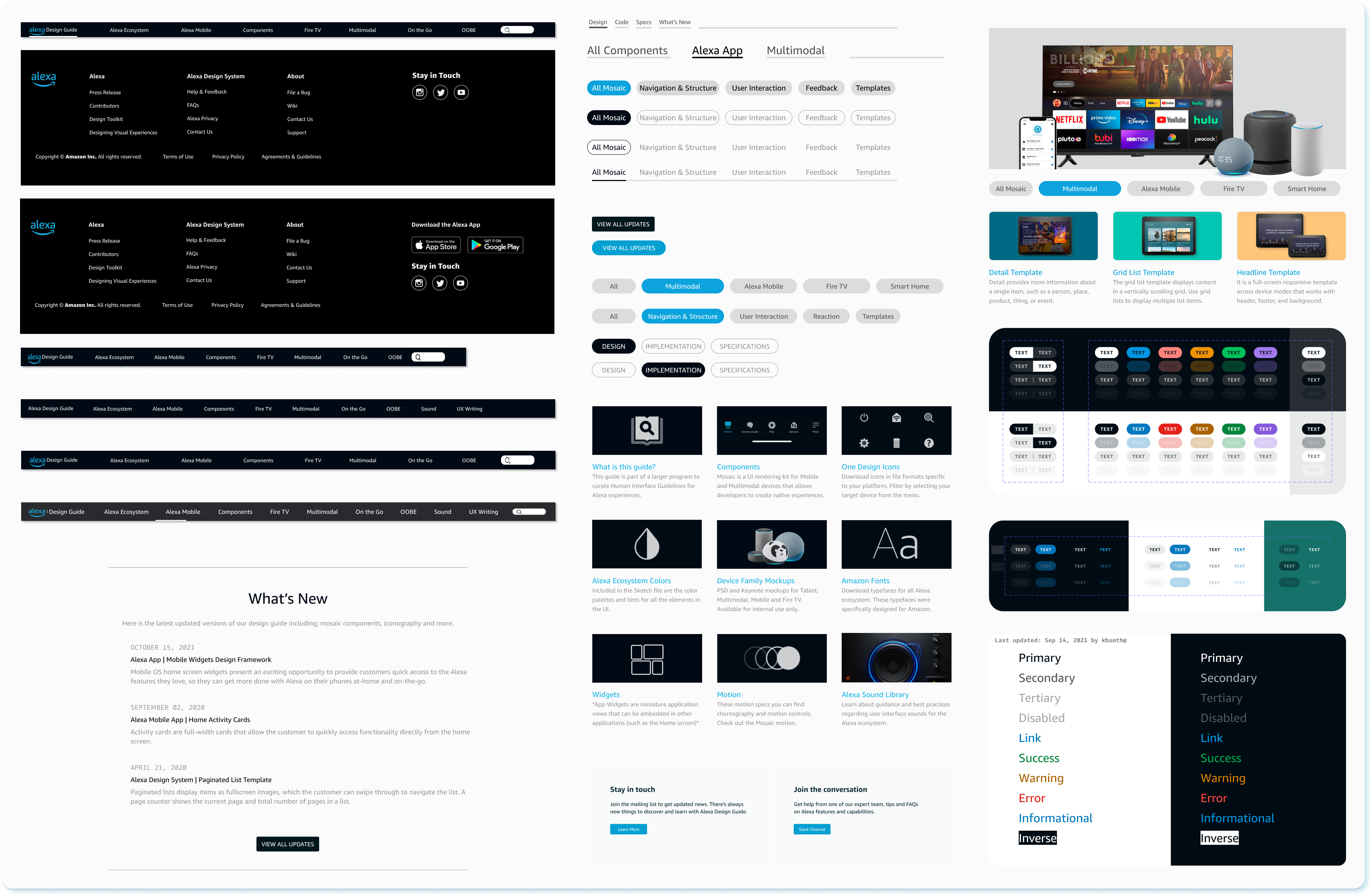
On top of that, a taxonomy that groups 50+ components into predictable families, and a wayfinding layer — surface switcher, section navigation, search, and a decision tree — that routes any team to the right pattern in seconds. Built on Dato CMS with a Suggest-an-Edit and contribution flow so it stays a living source of truth rather than going stale. This is the work as I designed it during my time on Alexa; the live guide has since evolved.

I was the sole designer on the IA and system itself, partnering with 2 PMs on scope and prioritization, an engineer on the CMS build, and a content strategist and copywriter to shape the guide's voice and in-product language.

Publishing to the guide's own CMS (Django, before Dato) was its own tracked source of P0 friction — the team logged it in the same frustrations sheet used for feedback on the design system and Mosaic. Bringing in draft content from a Quip doc required manually rebuilding every two-column section as a separate content block, then re-fixing paragraph formatting, links, and user/Alexa voice styling by hand. Inserting new content into an existing page meant copy-pasting a block, then guessing where it landed by switching back and forth between a structure view and a content view, since the structure view only showed each block's header.

None of that was a design problem — it was an authoring-tool problem quietly taxing the same contribution flow the Suggest-an-Edit model depended on. A "living source of truth" only stays living if adding to it doesn't feel like a chore, which is part of why the eventual move to Dato CMS mattered as much as the IA work itself.

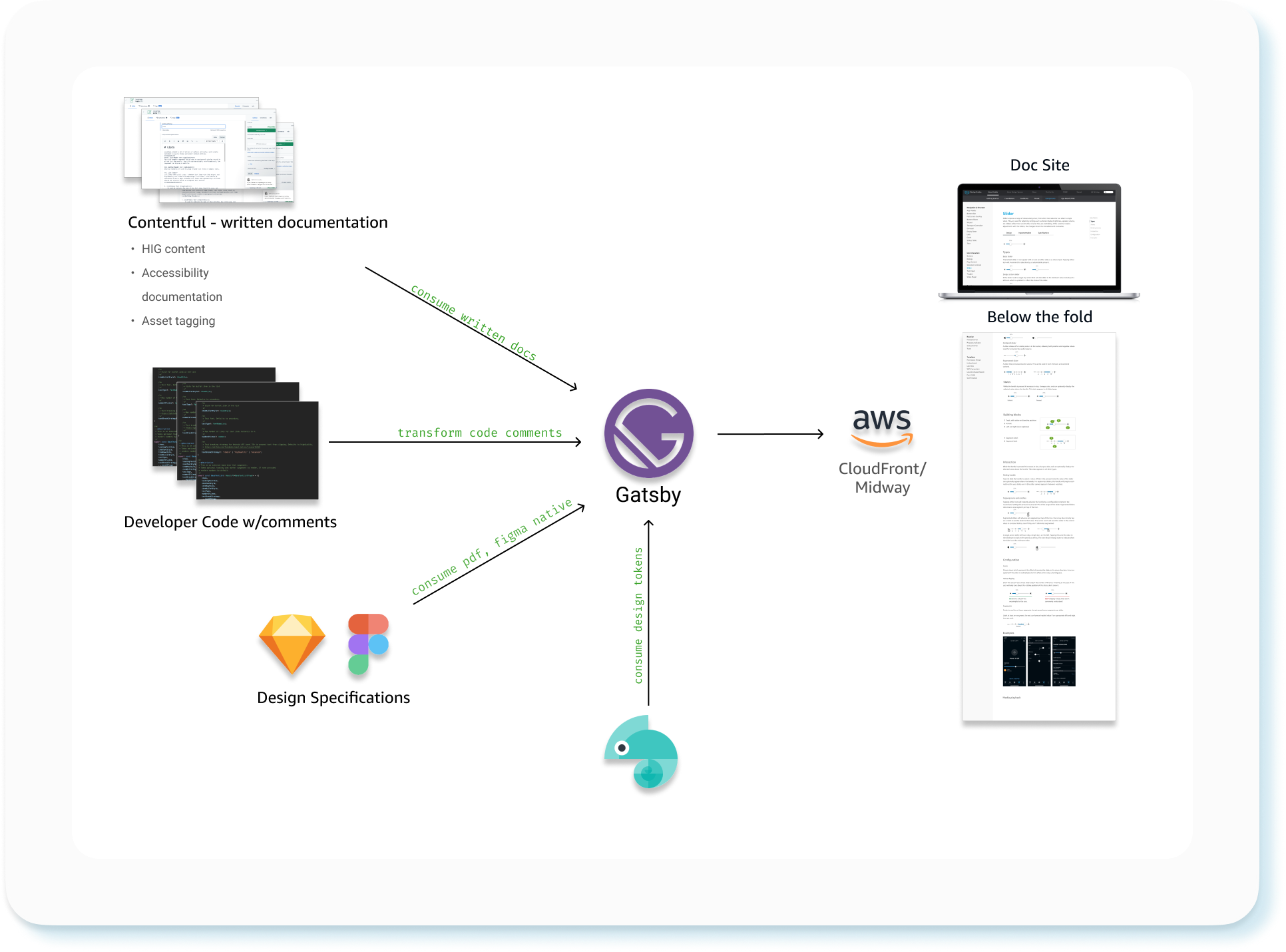
CMS authoring and publishing architecture diagram: Contentful written documentation, developer code comments, and design specs from Sketch/Figma/PDF all feed into Gatsby, which also consumes design tokens from a Chameleon token pipeline, and builds out to the live doc site hosted on CloudFront behind Midway auth
The publishing pipeline behind the guide — written docs, code comments, and design specs all compile through Gatsby into the live, Midway-gated doc site.
Information architecture

One structure, six verticals

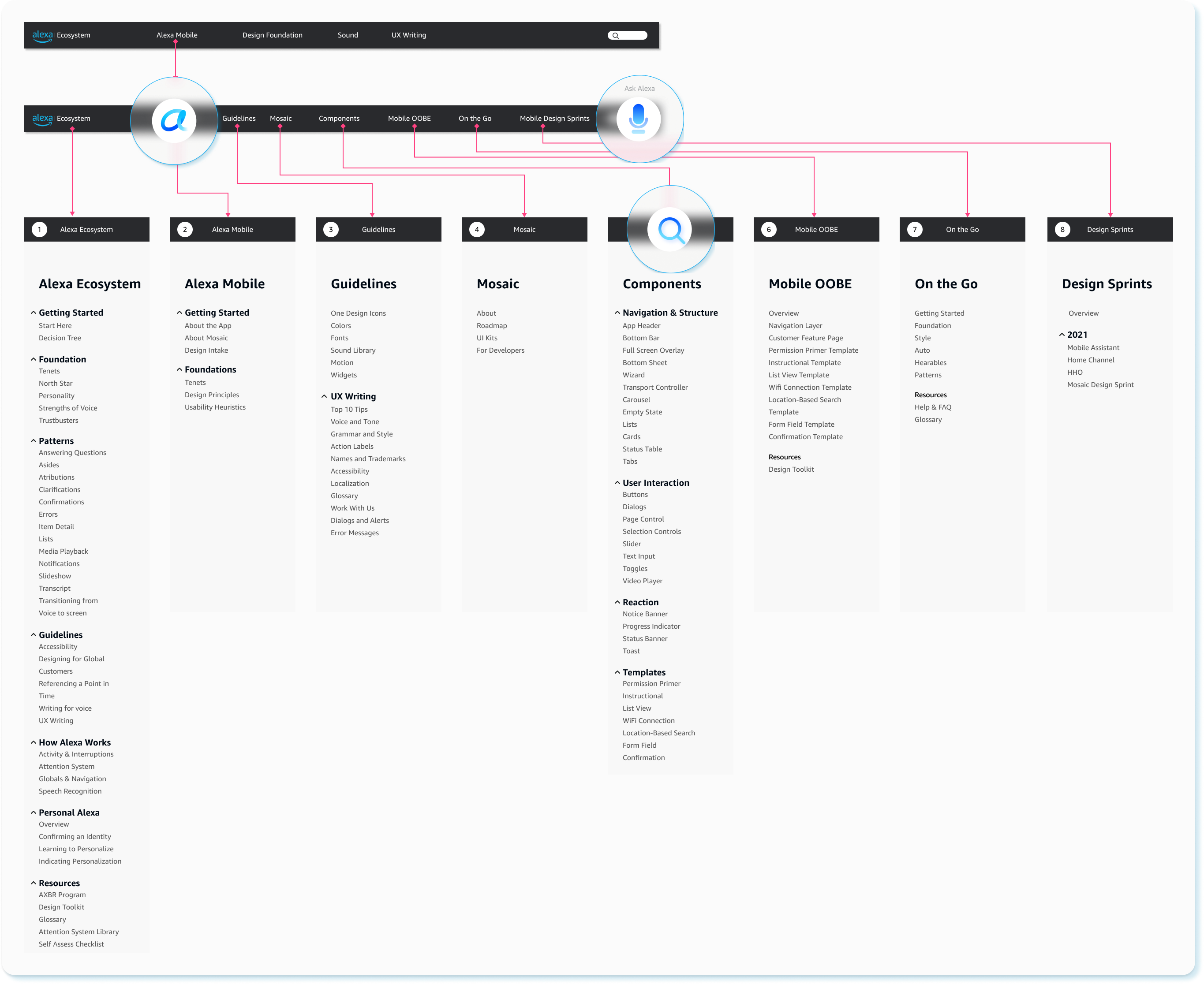
Alexa Ecosystem is the persistent umbrella — it's in every top nav bar. Alexa Design Guide is one vertical branching from it, alongside Alexa Mobile, Guidelines, Mosaic, Components, Mobile OOBE, On the Go, and Design Sprints, each expanding into its own nested tree in the sidebar.

Alexa Design Guide information architecture site map: eight top-level sections — Alexa Ecosystem, Alexa Mobile, Guidelines, Mosaic, Components, Mobile OOBE, On the Go, and Design Sprints — each shown as a navigation bar tab expanding into its own nested tree of pages, annotated with notes explaining how the top navigation bar surfaces the most important pages and how the sidebar drills down into specific pages within each category

From hardcoded styles to shared tokens

Alongside the guide, I led an early design-token exploration for Alexa Mobile — partnering with engineering to move component styling out of hardcoded, platform-specific code and into a shared Style Dictionary of semantic tokens, which reduces code, adds semantic clarity to every layout, and opens the door to theming and fast design changes across every Alexa Mobile surface at once.

The problem: components across Android, iOS, and React Native each had their styling — padding, font, color — hardcoded directly into platform-specific layout code. It worked, but it revealed nothing about a component's semantic structure and made theming or a rapid design change nearly impossible without touching every platform separately.

I proposed moving those values into a shared Style Dictionary of design tokens (built on the open-source Style Dictionary framework) — a component references a semantic token, like a body-01 text style, instead of a hardcoded value, and that single source compiles out into whatever format each platform actually needs. The goal was to move ownership of styling values from engineers hardcoding them per platform to designers defining them once.

This was still active exploration, not a finished system, during my time on the team — real open questions remained, like how to keep light and dark themes in sync across platforms and what quality checks a token change needs before it ships without breaking a build. Infrastructure work like this rarely has a clean finish line; it's judged by whether it made the next change easier, not by a launch date.

Explore it live

Walk the guide yourself

A conceptual recreation of the Alexa Design Guide's IA and wayfinding — browse the surfaces, open the component library, and try a fully working component spec. Opens right here in an overlay; you never leave the case study.

A conceptual recreation built for this case study, not the live internal tool.

Three lenses

Same guide, three audiences

Tap a piece of the guide, then switch lenses. The words change more than the facts do — that contrast is the point.

I don’t want to remember which of four different sites has the answer — I just want to look it up once, in one place.

One shared structure — Getting Started, Foundations, Guidelines, Components, and OOBE — that all six verticals follow, so learning it once means knowing where anything lives across the whole system.

4+ scattered, outdated sites consolidated into 1 authoritative home — the structural fix behind every other number in this case study.

There are dozens of components in here — I need to find the one I want without scrolling through all of them.

A taxonomy that groups 50+ components into predictable families, paired with a wayfinding layer — surface switcher, section navigation, search, and a decision tree — that routes any team to the right pattern in seconds.

50+ components documented with specs across 6 onboarded verticals — asset turnaround dropped from 2 weeks to 5 days.

If something’s wrong or missing in here, I want a way to fix it myself — not file a ticket and wait.

Built on Dato CMS with a Suggest-an-Edit and contribution flow, so the guide stays a living source of truth rather than going stale the way the original 4+ sites did.

One guide, continuously maintained by the teams that use it — instead of 4+ sources quietly drifting out of date again.

Paired metric cards — same 3 lenses
End-UserLook it up once, in one place
Design System1 shared structure, 6 verticals
Business Impact4+ sources → 1 authoritative home
End-UserFind the right component in seconds
Design System1 taxonomy, search, decision tree
Business Impact50+ components, 5-day turnaround
End-UserFix it yourself, no ticket needed
Design SystemDato CMS, Suggest-an-Edit flow
Business ImpactA living guide, not a stale one
Impact

What changed

Sources
4+ → 1
Scattered sites unified into one guide
Verticals
6
Alexa surfaces on one shared structure
Components
50+
UI components documented with specs
Turnaround
5d
Down from 2 weeks to get assets, across all 6 onboarded verticals

Infrastructure is design too

The guide never touched a customer — but it changed how a whole org shipped, freeing teams to improve the experience instead of reinventing patterns or hunting for basics.

Designing the tools your team relies on is quiet, high-leverage work: it compounds across every project that comes after it.

If I were starting over, I'd have brought engineering and PM into the room earlier to align on technical direction before committing to an information architecture, and pushed for direct research with the designers and engineers actually building Alexa skills — the guide would have solved real friction sooner instead of some of it surfacing only after launch.

Charlie is a very strong asset to the team. He takes ownership seriously, and ensures he is insisting on high standards, thus earning trust of his team members.
Jon Madison · Sr. UX Design Technologist, L6
Next project Amazon Installments