I'm Going Shopping

Role
Interaction & UX Lead · Product Designer, Alexa Mobile
Initiative
Stay Organized · Shopping List
Platform
Voice (Echo) · iOS · Android
Result
40K+ installs · 18% WoW adoption growth
Team
1 PM · 2 engineers · design & voice support

As interaction and UX lead, I grew adoption of a top retention driver that reached only 4.4% of weekly active users — not by redesigning the list, but by removing friction at two moments: a household voice broadcast and home-screen widgets.

GROWTH
18%
Organic widget-adoption growth, week over week
INSTALLS
40K+
Widget installs, iOS & Android
COVERAGE
50%
US household experiment coverage

Short on time? Pick your read.

Full case study — process, tradeoffs, and craft.

A top retention driver almost no one used

Shopping List actions rank among Alexa's top retention drivers — yet the List page reached just 4.4% of weekly active users. Getting to a list took too many taps, and households had no way to shop a shared list together in real time.

Part of the Alexa app's Stay Organized initiative, the goal was clear: turn a proven retention lever into everyday engagement.

Meet people where they already are

Two bets, each removing friction at a different moment. "I'm going shopping" lets a household member broadcast a shopping run — a voice announcement to Echo devices plus a push to everyone's phone — turning a solo task into shared, real-time collaboration (shipped as a 50% US experiment).

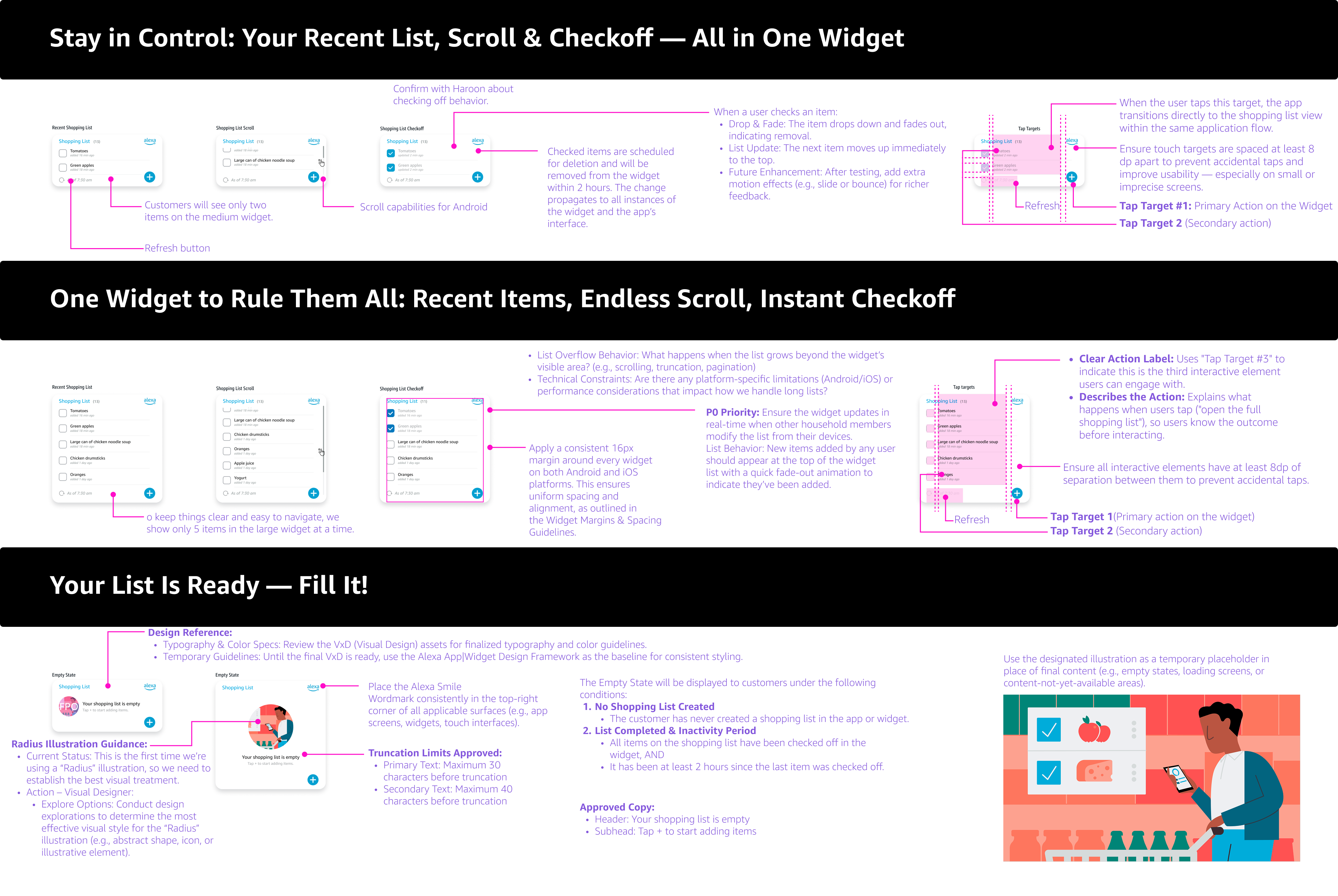
Home-screen widgets for iOS and Android put the list one glance away — no app open required. I designed to each platform's strengths: iOS for previews and quick-access deep links, Android for full in-widget list management. Every decision favored glanceability and platform-native patterns.

I led the interaction and UX design, working closely with a design support partner and a voice support designer on the broadcast experience, and with two engineers who built the client-side experience. A Product Manager owned the business goals this fed into and helped me prioritize what shipped in each phase.

Three lenses

Same fix, three audiences

Tap a bet, then switch lenses. The words change more than the facts do — that contrast is the point.

I’m already heading to the store — I just want everyone at home to see the list before I go, not text three people separately.

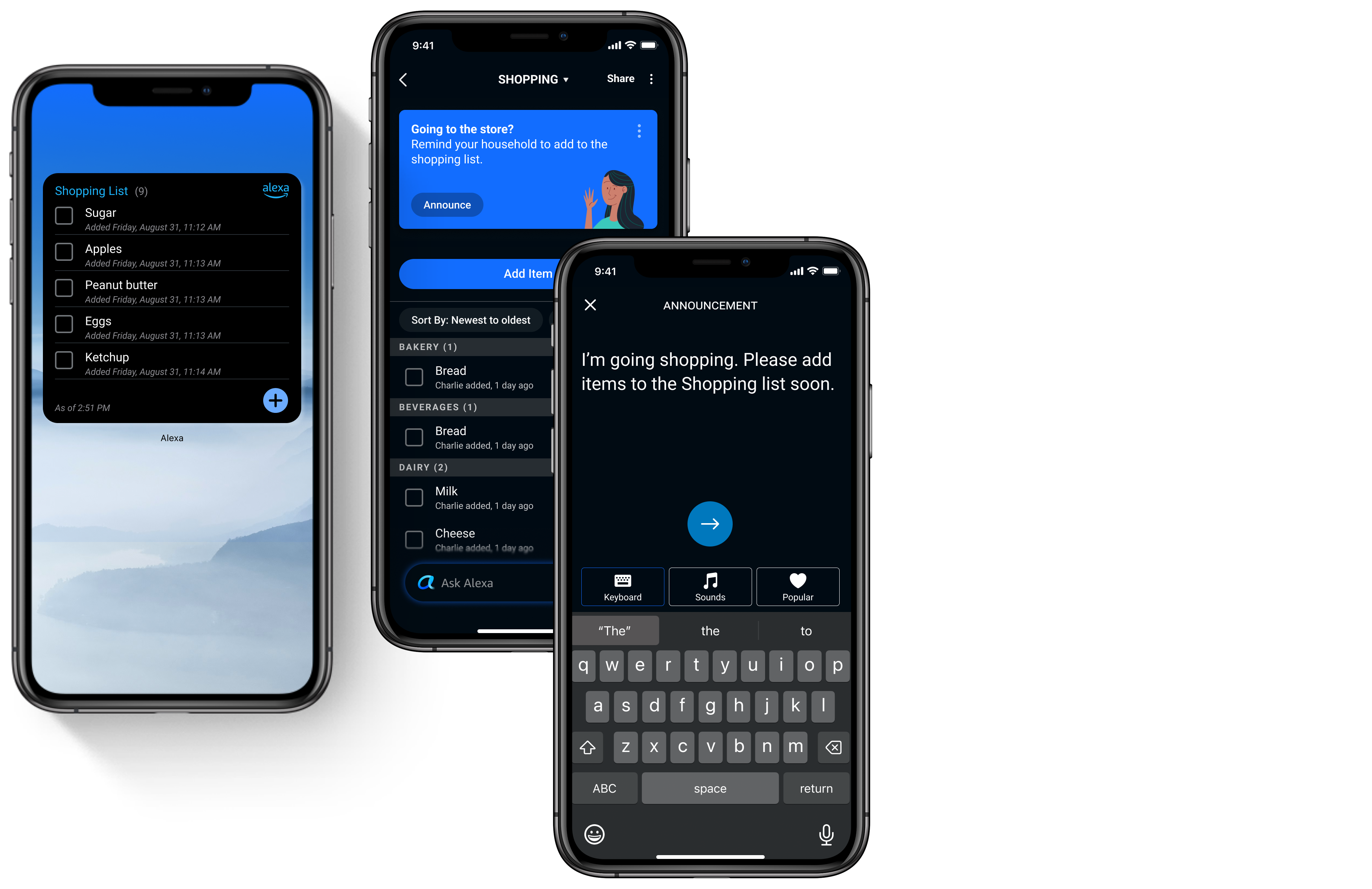
One "Going to the store?" prompt, one Announce action — a voice broadcast to Echo devices plus a push to every household member's phone, all pointed at the same shared list. Shipped as a 50% US experiment.

Turned a solo task into shared, real-time collaboration and shipped as a 50% US experiment. The experiment’s outcome is tracked separately from the widget-adoption growth reported below.

I don’t need to edit my list right now — I just want to glance at it without unlocking into the app.

iOS widget designed for previews and quick-access deep links — the platform's constraint (one tap target per widget) shaped the decision to lean on linking into the app rather than in-place editing.

Part of 40K+ widget installs across iOS & Android — a standing retention surface that costs zero re-engagement spend once installed.

Let me actually check things off from my home screen — I’m not opening an app for that.

Android widget designed for real widget-level interaction — full list management in place, matching the platform's stronger in-widget capability instead of settling for the iOS-style preview pattern.

24.5K weekly active widget users — people managing the list without ever opening the app, on a feature that used to reach just 4.4% of WAU.

Paired metric cards — same 3 lenses
End-UserOne tap tells the whole household
Design System1 prompt, voice + push, 1 shared list
Business Impact50% US experiment coverage
End-UserCheck the list without opening the app
Design SystemPreview + deep-link, 1 tap target
Business Impact40K+ installs, iOS & Android
End-UserManage the list right from the home screen
Design SystemFull in-widget list management
Business Impact24.5K weekly active widget users
Ingress

Getting to the announcement

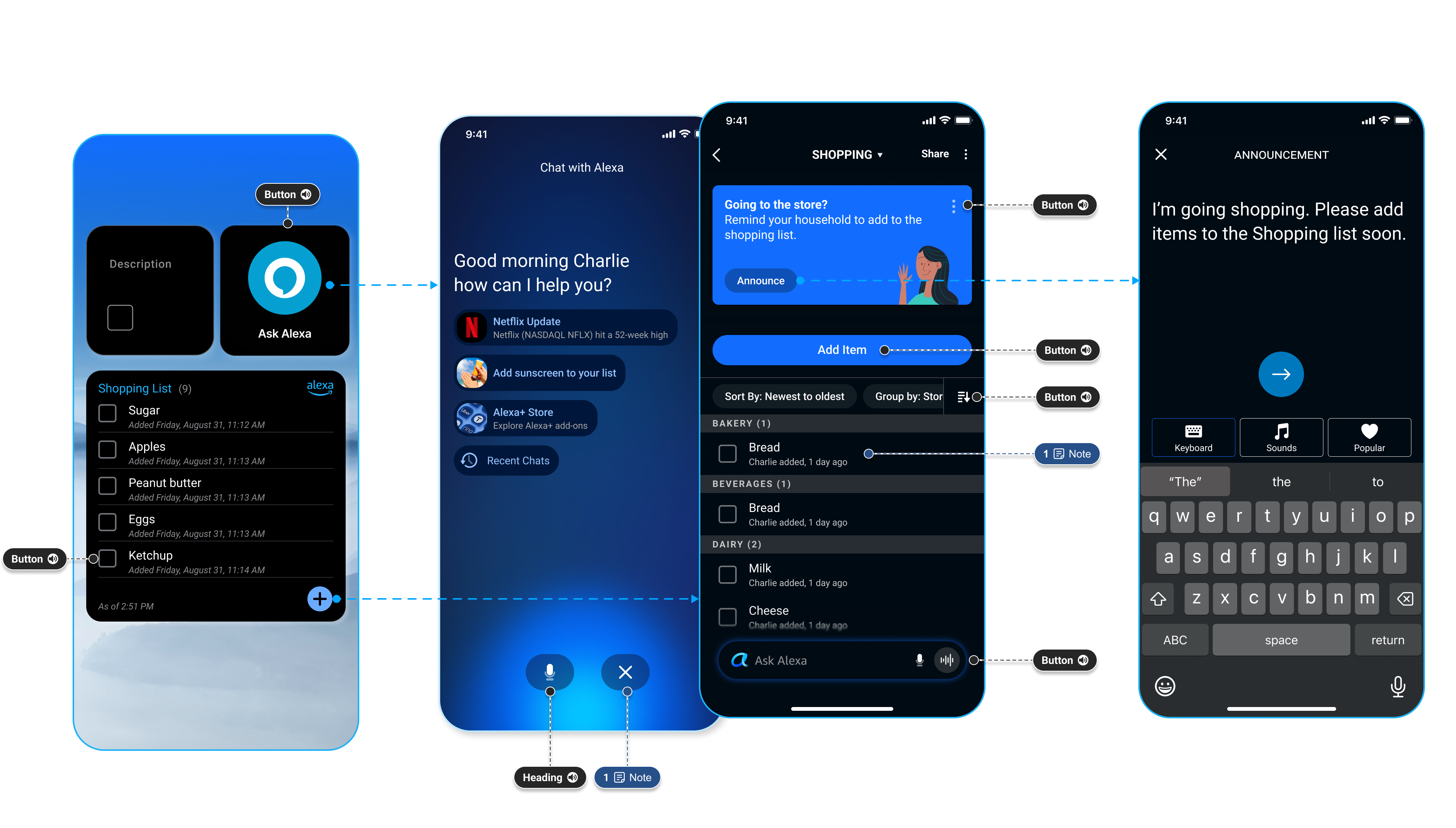
Whether someone taps + on the Shopping List widget or asks Alexa in chat, both land on the same "Going to the store?" prompt — one tap to Announce it to the household. Annotations mark the accessibility labels — buttons, headings, and VoiceOver notes — built into each entry point.

Tap the glowing Shopping List widget below to see its full spec

Annotated diagram of two ingress points into the I'm Going Shopping announcement: the Shopping List widget's quick-add button and the Ask Alexa chat screen, both routing into the 'Going to the store?' prompt with an Announce button, the Announcement compose screen, and the shared Shopping List — each annotated with VoiceOver accessibility labels for buttons, headings, and notes
Final design

The household broadcast, end to end

I'm Going Shopping flow across three screens: the household shopping list, the announcement prompt with an Announce button, and the sent voice announcement
Impact

Measurable outcomes

Engagement
0
Organic widget-adoption growth, week over week
Installs
0
Widget installs across iOS & Android
Active
0
Weekly active widget users
Coverage
0
US household reach in experiment

Shipped and live today in the Alexa app. See it on Amazon →

Reduce the cost of the moment

The wins didn't come from a flashier list page — they came from meeting people before they opened the app: on the home screen, and across the household. Widget adoption compounded at 18% week over week on pure organic growth.

Sometimes the highest-leverage design isn't inside your feature — it's removing the reason people never reach it.

If I were starting over, I'd lean on the AI-assisted prototyping tools I use today. The team was mid-migration from Sketch to Figma at the time, and validating the broadcast and widget interactions meant manually re-exporting components between tools and hand-assembling static frames in InVision just to test a behavior. That overhead ate time I'd rather have spent iterating with the junior engineers I was pairing with — themselves still learning to navigate the same Amazon design-and-ship process I was.

Charles demonstrates exceptional ownership, driving projects to completion. His strong backbone lets him confidently express his views and respectfully challenge ideas — and his bias for action shows in how quickly he spots opportunities and ships.
Michelle Ma · Sr. UX Designer, Alexa, L6
Next project Alexa Design Guide