⌂

Comparison card — states & variants

The visual states a plan card can take, a motion study of selecting and deselecting an offer, the provider art variants, and how the component's variant library is composed. Built on Material 3 color, type, and motion tokens.

1 State specifications
2 Anatomy
Comparison card anatomy
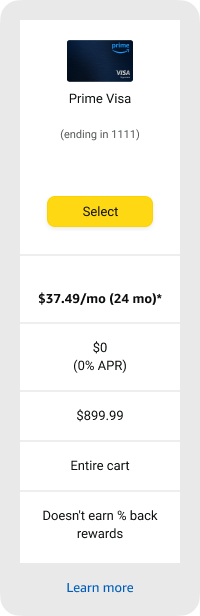
  1. 1Container — surface, corner.large, elevation per state.
  2. 2Provider art — instance-swap driven by Locale + Provider.
  3. 3Provider name & last four — title-medium / body-small.
  4. 4Primary CTA — filled button; label & treatment change by state.
  5. 5Comparison rows — title labels toggle with Show TT Text.
  6. 6Text link — “Learn more”, toggles with Text link.
3 Interaction states

Pulled from the Stores Design Library — Generic button · Primary · Base. Amazon (RIO) uses discrete, token-driven fills per state rather than opacity layers:

Defaultprimary-action-primary · #ffd814
Activeprimary-action-tertiary · #f8bd19
Focusfocus-primary ring · #888c8c
Active + Focustertiary fill + focus ring
Disabledbackground-disabled #f0f2f2 · font-disabled #565959
4 Motion · select & deselect
Unselected card Selected card

Selecting an offer tints the surface to the primary container and lifts the card with elevation, while the CTA morphs from a filled Select into a pill-shaped Selected. Deselecting reverses it. Motion uses M3 emphasized easing with a spring on the CTA.

Unselected Selected
dur.medium · 400ms easing.emphasized animates: surface tint · elevation · CTA shape
5 Variants library · live instance
CP2.0 MobileVariant properties
Provider's art image
Theming & platform
Layout · LTR

Select from 1 plan

Provider art
(ending in 1111)
Learn more

A live instance of the component — flipping a property re-renders it: Show TT Text reveals each row's title label, Rewards / Applies to / Additional row add or remove rows, Text link toggles “Learn more”, State restyles the surface & CTA, Locale / Provider swap the currency format and card art, Theming switches light/dark mode, and Platform shows how the same card renders inline on mobile vs. inside a dismissible modal on desktop. One component, every combination — e.g. State=Selected · Locale=Germany · Provider=Prime Visa · Theming=Dark.

Provider art · tap or arrow-key to swap the live instance
Scroll

6 Do & don't
✓ Do
✕ Don't
7 Accessibility
✓ Color contrast

State text and CTA labels meet WCAG AA against their surfaces; disabled uses the paired on-surface 38% / background-disabled tokens.

✓ Non-color reliance

Selected is signalled by a border + label change, not hue alone — legible for color-blind users.

✓ Keyboard

Full tab order with visible focus. Provider art is an arrow-key radiogroup using roving tabindex; switches are real role="switch" buttons.

✓ Screen reader

Selection changes announce through an aria-live status region; every control is labeled (radiogroup, switches, selects).

✓ Reduced motion

Honors prefers-reduced-motion — section entrances and the select/deselect auto-play stop for users who opt out.

✓ Internationalization

Copy localizes across 9 languages, currency & numerals format natively via Intl, and layout mirrors to RTL for right-to-left locales.

Conformance note: these reflect design decisions and intent. Full WCAG 2.1 AA conformance requires manual testing with assistive technologies (screen readers, switch access) and expert review.