← Back to case study
Internal design system · Amazon Alexa

One guide behind every Alexa surface.

Alexa's design guidance was scattered across wikis, Quip docs, Word files, and engineering pages — a guide that had come to ship the org chart. I designed the information architecture to consolidate six surfaces into one navigable system — a shared structure, a taxonomy for 50+ components, and a wayfinding model that let any team find the right pattern fast. This is that work, as I designed it during my time on Alexa.

6Verticals
50+Components
4+→1Sources unified
1Shared IA
RoleLead designer — IA & navigation
TeamAlexa Design Systems
Timeframe2021, during my time on Alexa
DeliveredIA framework, nav model & scaffold
The system spans six surfaces — switch between them to explore

Alexa Mobile is the surface documented in full here. The consolidation gave all six verticals one shared structure — switch between them to feel the system.

The work · Information architecture

Six scattered surfaces,
one structure.

The problem wasn't the content — it was findability. Guidance lived across wikis, Quip, Word docs, and engineering pages, maintained by teams that didn't talk to each other, so the guide shipped the org chart: duplicated, conflicting, and impossible to search. I designed one shared architecture every surface follows, so learning it once means knowing where anything lives.

01

Information architecture

One shared structure every vertical follows — learn it once, know it everywhere.

02

Taxonomy

50+ components grouped into predictable families, so patterns are where you'd expect.

03

Wayfinding

Surface switcher, section nav, search, and a decision tree — the right pattern in seconds.

My contribution · The navigation framework

I designed the skeleton every team onboards to.

My task was the top-level navigation strategy and the two layers of navigation — then coordinating with each vertical to secure one naming convention so every surface repeats the same five sections. I built the initial framework and scaffold; partners migrated their content into it on the CMS platform.

Layer 1 Surface switcher
Choose a surface

The top-level move: six Alexa surfaces, one switcher. Pick where you are — the structure underneath stays identical everywhere.

Alexa Mobile Multimodal Smart Home Fire Tablets Fire TV Alexa Personality
every surface follows the same five sections
Layer 2 Section structure
The repeated five-section frame

The second layer: the same five sections in the same order on every surface. This is the naming convention I secured across teams — learn it once, navigate all five.

01Getting Started
02Foundations
03Guidelines
04Components
05OOBE
Who built what

My frame, their content.

My work — the framework

I built the skeleton & the rules

Two-layer nav model Cross-vertical alignment Shared naming convention Initial frame & scaffold
Partner teams — the content

They migrated onto the frame

Populated the five sections Migrated to the CMS Onboarded predictably
The problem & the approach

A guide that shipped the org chart.

Guidance was authored by contributors across many Amazon orgs with little communication between them. Over time it fragmented — the guide mirrored the org structure instead of the customer's mental model. The brief was to turn it into one resource that defines, communicates, and raises the CX standards for Alexa.

What was brokenThe pain points

  • Conflicting & outdated content that no one owned end to end.
  • Duplicated guidance — the same pattern documented differently by different teams.
  • Too verbose — everything documented, so nothing was easy to find.
  • Hard to consume — text-heavy, few graphics, and not searchable.

What I decidedThe design moves

  • Re-architect around the customer's mental model, not the org chart.
  • Apply an 80/20 rule — surface what 80% of designers need; let the deep 20% live elsewhere.
  • A two-layer nav model plus one naming convention so every surface reads the same.
  • Lean on visuals and lightweight motion over walls of text, on a flexible CMS.
The hard part

The real work wasn't the layout — it was alignment. Getting contributors across orgs that had never coordinated to agree on one shared structure and a single naming convention, so the guide could stop shipping the org chart.

Process · Iteration

Finding the mental model.

The first structure wasn't right. Early cuts organized the guide the way the teams were organized — and the feedback was blunt: that's not how designers actually think. The turning point was re-architecting around the customer's task, not the org chart.

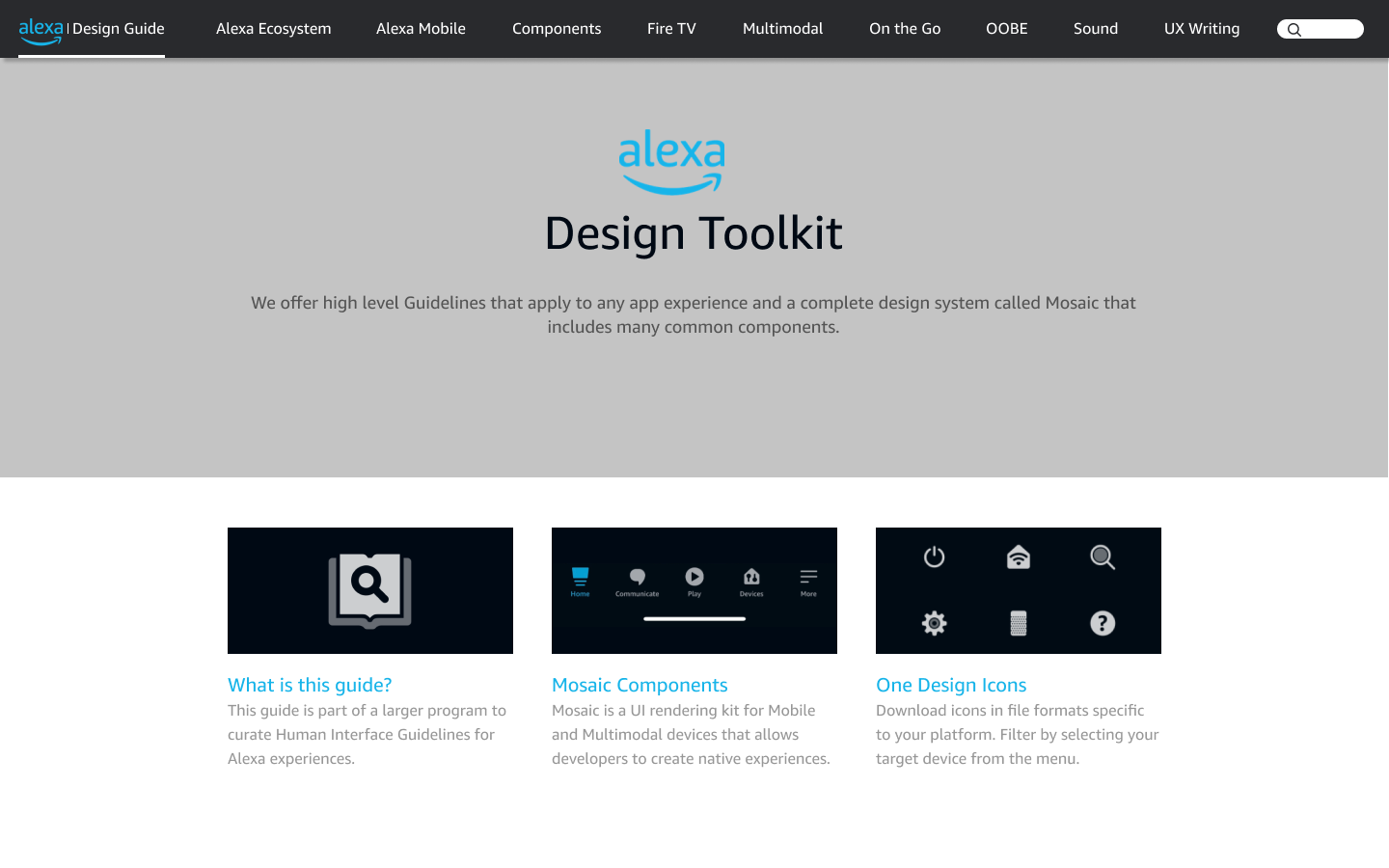
First exploration of the design guide structure
01 First exploration

A first cut at the structure

An early landing page and navigation — a starting point to react to, not the answer.

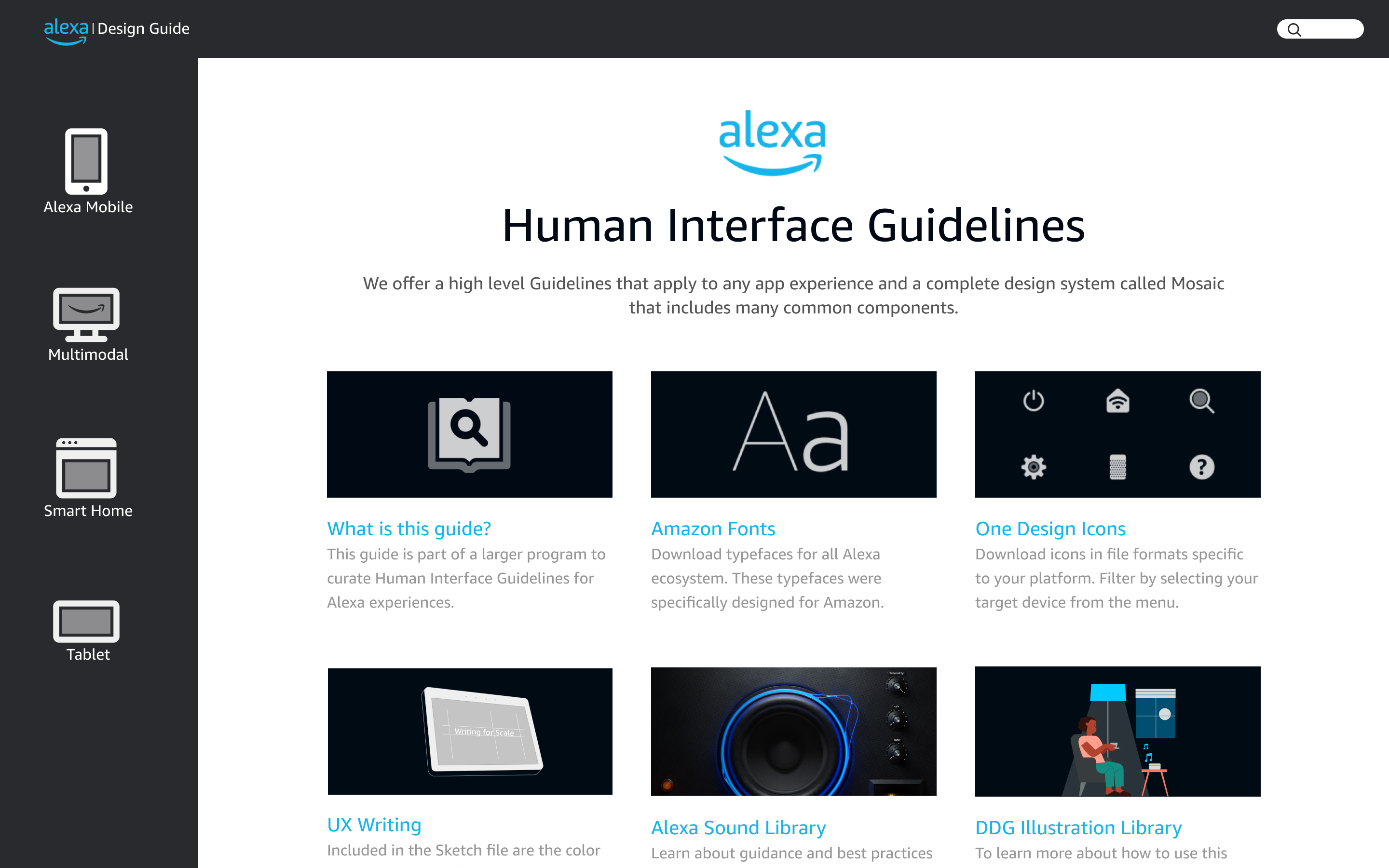
Reworked exploration after mental-model feedback
02 The pivot

“This isn't the mental model”

Feedback pushed back: the structure mapped the org, not the way designers actually look for things. I reworked the landing and nav around the task.

“This isn't the mental model — it ships the org chart.”

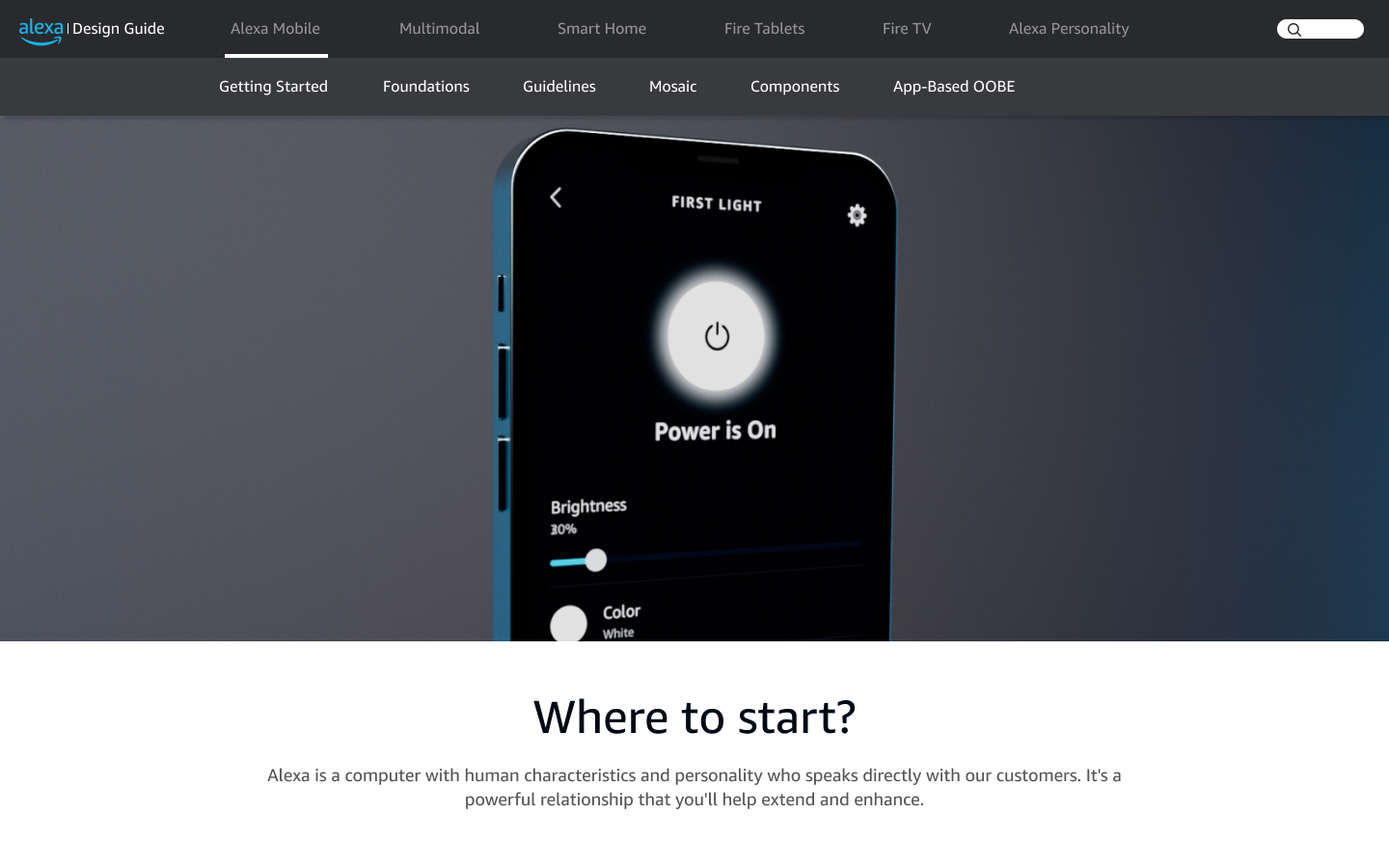
Final landing page mock handed off for implementation
03 Final mocks

The structure that shipped

The two-layer model — a surface switcher over shared sections — resolved into the mocks handed off for implementation.

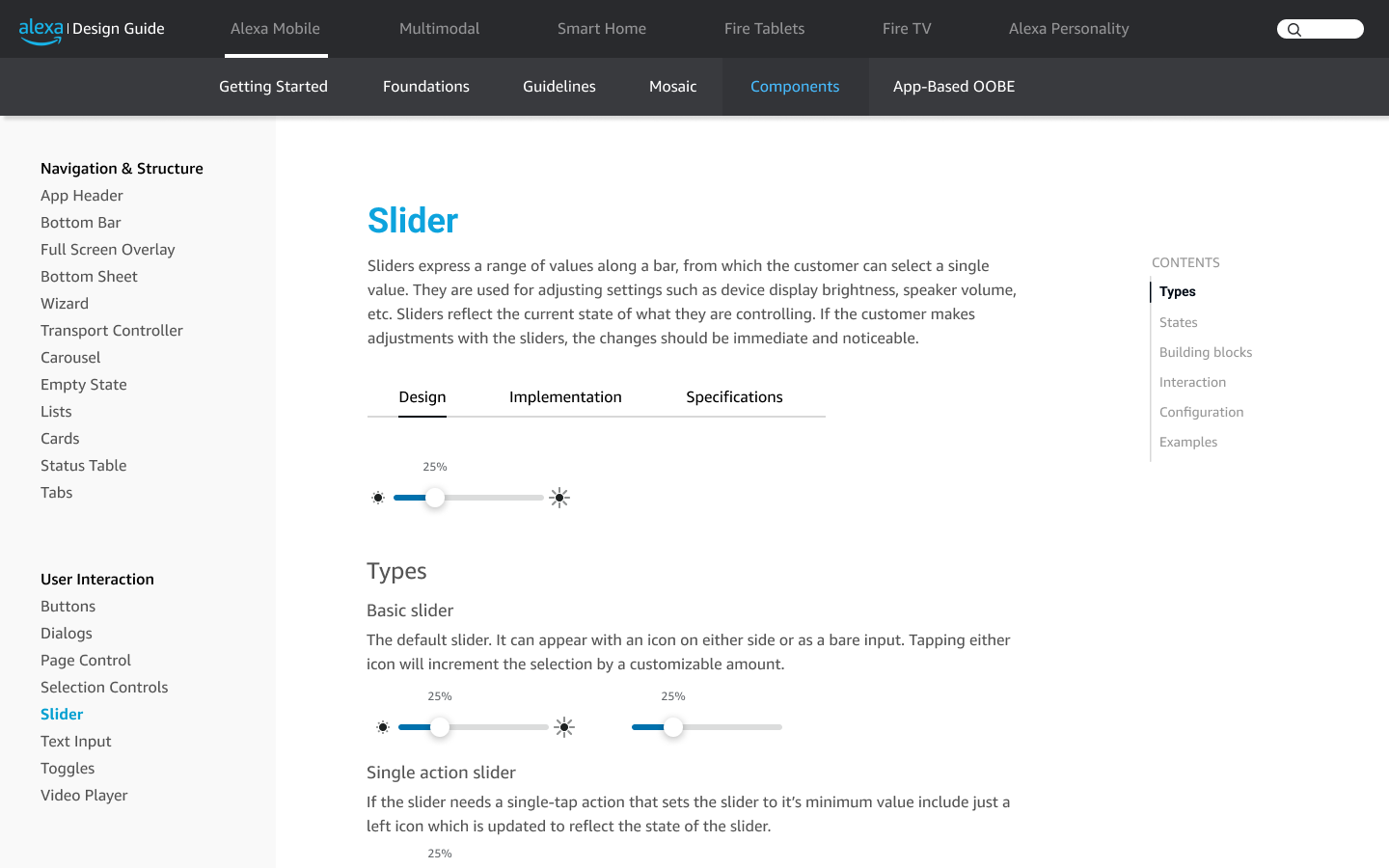
The final mocks handed off for implementation. The details were refined downstream, but the two-layer navigation and shared section structure held — a landing page that routes to surfaces, and an interior page with the repeated left-nav sections.

Final landing page mock
Landing page — the surface switcher, layer one.
Interior detailed page with left navigation
Interior page — the shared section structure, layer two.

Original design mocks from my time on Alexa, shown as case-study evidence of the work I delivered.

Final concept · Animated

The final concept mocks, brought together as one continuous system across Alexa Mobile, Multimodal, Smart Home, Fire Tablets, and Fire TV — the resolved structure in motion, not just static frames.

01

Getting Started

Orientation for anyone defining the Alexa experience — designers, PMs, engineers, and Bar Raisers. A start-here overview and a decision tree that routes teams to the right pattern fast.

02

Foundations

The building blocks shared across every surface — type, color, iconography, and motion. Shown here in brief; color is the one I've expanded, with the real tokens from the library.

Aa
Type

Typography

Amazon Ember for the interface, Bookerly for long-form reading — with a defined size & style scale.

Color

Color

Neutral fills plus a set of accent hues — where and how color is applied across the UI.

Icons

Iconography

The shared VDNA icon set at 12–72px sizes, with usage guidance for weight and alignment.

Motion

Motion

Choreography and timing controls — how elements enter, respond, and settle.

Foundations · Color

A neutral surface, brought to life by accent

The UI rests on a layered neutral scale, with reserved roles for action, status, and tinted card surfaces. These are the actual tokens from the Alexa Mobile UI Library (light mode).

Calendar linked
Gmail · Outlook · iCloud
Default

Neutral surface at rest — the card's default state, using neutral60 and neutral30 for a calm, low-emphasis appearance.

All tokens — the active one tracks the card above
background
#FFFFFF
neutral60
#F5F5F5
neutral50
#E8E9E9
neutral30
#8C8F92
neutral20
#51555B
neutral10
#010B13
action / primary
#0078BE
action40
#05A0D1
action30
#16A693
action / secondary
#E4FAFF
success
#00833B
status70
#FB9C03
warning
#A96000
error
#E12119
violet
#8356DC
bg-blue
#E4FAFF
bg-cyan
#E9FAFB
bg-green
#E9FAF2
bg-violet
#F9F4FC
bg-red
#FFF4F3
bg-yellow
#FFF6E0
Neutral — surface & text
background
#FFFFFF
neutral60
#F5F5F5
neutral50
#E8E9E9
neutral30
#8C8F92
neutral20
#51555B
neutral10
#010B13
Action — interactive
action / primary
#0078BE
action40
#05A0D1
action30
#16A693
action / secondary
#E4FAFF
Status — feedback
success
#00833B
status70
#FB9C03
warning
#A96000
error
#E12119
violet
#8356DC
Card surfaces — tinted backgrounds
bg-blue
#E4FAFF
bg-cyan
#E9FAFB
bg-green
#E9FAF2
bg-violet
#F9F4FC
bg-red
#FFF4F3
bg-yellow
#FFF6E0

Tokens and hex values are the real light-mode color variables from the Alexa Mobile UI Library. The system also ships a full dark-mode set. Color is applied with restraint — neutrals carry the interface; action, status, and tinted card surfaces signal meaning.

03

Guidelines

The standards that keep the experience usable, inclusive, and global — a mobile-first philosophy, Nielsen's usability heuristics adapted for Alexa, notifications, and right-to-left internationalization.

Guidelines · Mobile First

Alexa mobile is touch-forward, on-the-go, personal.

Guidelines · Usability Heuristics

Ten heuristics, adapted for Alexa

Jakob Nielsen's classic usability heuristics, mapped to real Alexa app patterns. Showing three — expand for the full set of ten.

Guideline

Mobile Notifications

When to notify and how — timely, relevant, and personalized to drive engagement without noise.

i18n

RTL Internationalization

Mirrored layouts and flow for right-to-left locales, so the app reads naturally in every market.

A11y

Accessibility

Contrast that survives sunlight and dimmed screens, generous touch targets, and assistive-tech support for all customers.

04

Components

50+ UI components, each documented end to end — anatomy, interaction states, dynamic behavior, copy guidance, redlines, and linked code. Browse the full library, or open the live Slider specification.

Library

Browse all 50+ →

The full component library — filterable, light & dark.

Live spec

Slider →

Building blocks, centered & segmented — fully interactive.

Component

Bottom Sheet

Modal actions with dynamic height & dismissal rules.

Component

Voice Chrome

Alexa's listening & responding states.

05

Also in the guide

Two more areas the guide covered end to end. Summarized here so the focus stays on the consolidation and navigation work above.

Outcome & reflection

Where it landed.

I delivered the information architecture, the two-layer navigation model, and the scaffold, and partner teams began migrating their content onto it. Mid-implementation, the broader overhaul was deprioritized as funding shifted, and I moved to another team. The guide today lives under the Amazon Brand Portal and continues to evolve.

01 · Delivered

The framework shipped to partners

The IA, the navigation model, and the section scaffold were validated and handed off — teams started onboarding their surfaces onto one shared structure.

02 · Deprioritized

Funding shifted mid-implementation

The larger overhaul lost dedicated funding before it was fully migrated. I transitioned to another team as the effort wound down.

03 · Since then

The guide keeps evolving

It now lives under the Brand Portal. Without sustained ownership, some of the fragmentation the framework was built to solve has crept back in.

What I took from it

A fragmented guide is a funding-and-ownership problem as much as an information-architecture one.

The right structure only holds if it's resourced to be maintained — without that, even a sound system fragments again. That was the root risk I'd flagged going in, and watching it play out confirmed the real work isn't just designing the model; it's securing the ownership that keeps it alive.